Learning Portal Technical Tips
Updated February 9th, 2026
Q: How do I disable Pop-Up Blockers?
A: Refer to this guide here before taking courses.
Q: My course keeps freezing on me.
A: Try doing these things first:
- Close your browser and clear your browsing history before logging back in again.
- Change your default pop-ups & redirects settings. Choose the option: Sites automatically follow this setting when you visit them so that sites can send pop-ups and use redirects.
- Check your default font size is and ensure that it is set to Medium (recommended).
- Consider switching to using a different browser e.g. if you’ve been using Chrome, switch to Firefox or Edge and vice versa.
- If you open a section or module, make some progress in it before exiting out. There are times when having no action after starting a module causes the service to halt.
- If you are using a mobile device like a Toughbook, try using a desktop. There may be either a compatibility issue or network capacity issue with using these devices.
Q: Where can I find my course completion certificates?
A: Under the Completed In-House Courses section of your Learner Dashboard.

Q: Why isn't my course completion showing on my POST Profile?
A: Double-check what kind of course it is.
1. Download and view the course completion certificate.

If the certificate has the highlighted section (Requires POST Multimedia Roster for CPT.), then you will need to contact your training manager to submit a course roster into EDI.
If the certificate does not have this, then please contact us to resolve this issue.
Q: Why isn't my First Aid course completing?
A: There can be two things preventing your course completion:
1. You went back into a module for review. After completing a module and then revisiting it, the system considers it a new attempt and deletes the completion history of your first attempt. To fix this, ensure that none of the online modules display Continue Attempt.
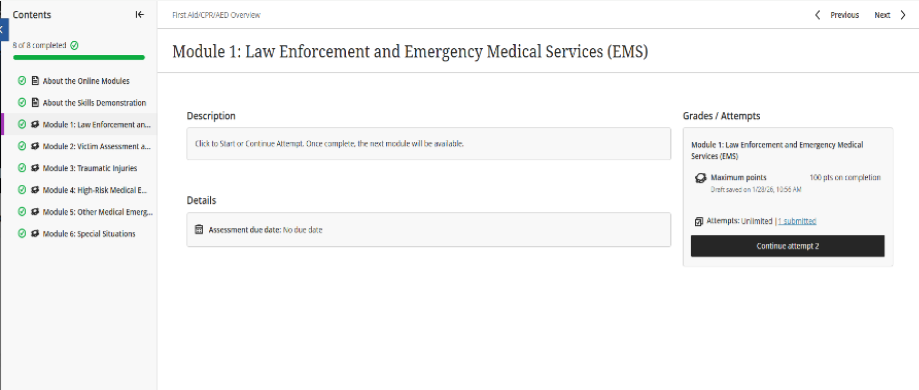
2. Check that you input your Skills Demonstration EXACTLY as described in the question. The date must be entered in the following format: MM/DD/YYYY. We plan on implementing a better date entry system in the future.
Q: Why did I lose all my progress in the Courtroom Testimony course?
A: The course currently has issues with saving progress. Because of this, please complete the course in one sitting and do not close out of it. We plan on fixing this issue soon. Also, if you passed the assessment in the past and the course did not show you as complete, let our support team know. As of January 28, 2026 the completion tracking issue has been fixed.
Q: Why am I having drag-and-drop issues with the Vehicle Pursuit Policy course?
A: The course currently has issues with the drag and drop, depending on the browser you are using. We plan on updating this course soon. In the meantime, try the following:
- Use the Firefox browser to run the course.
- If using Chrome or Edge browser, zoom to 150% in the course.
- Drag slightly above or below the area.
- Full-screen the window. The drag and drop zones are based on the zoom of the screen, and various screens have different zooms.
- Keep trying until it binds. The zones may not have fully detected your mouse and answer box locations, so try to find a sweet spot for the box to drop into.
Q: Why am I having drag-and-drop issues with the Search Warrant Fundamentals course?
A: Here are a few tips concerning this course:
- When you select an item, be sure that you click INSIDE of the white box to select an answer.
- If you click on the outline of the box, it behaves incorrectly.
- Drag the corresponding item to the right and click Submit.
- Once you have submitted your answers, the ones that are correct will show in green and the ones that have not been matched will reappear on the left.
- You can continue to drag and submit until you have all of the answers correct, at which point you can continue with the next step in the course.
